Export writes the mattes and the cleanup takes as image sequences and makes a Nuke script that reads them. You paste the script into Nuke with Ctrl+V.
What to export
Open Export on the stage bar.
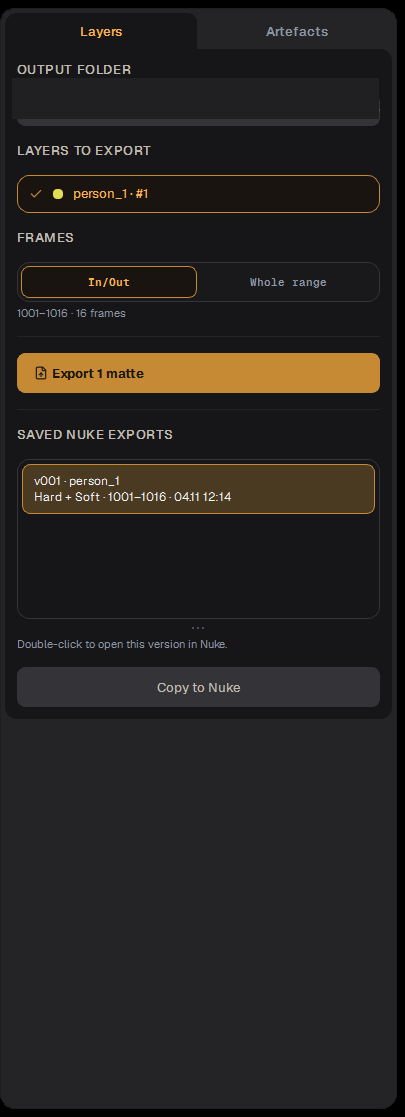
The Export drawer after an export: one layer ticked, In/Out, a saved Nuke export
Layers to export: tick the layers whose mattes go out. A note tells you when a new layer is not ticked yet.
Artefacts to export: the cleanup and Edge Fix runs to place over the plate in the script.
Frames: In/Out writes the clip's IN/OUT only; Whole range writes every frame the ticked layers have.
Format: where a row shows a format label, click it to choose EXR (32-bit float, for post-production) or PNG (8-bit, general use).
Layers / Artefacts at the top switch between the two lists.
Output folder
Output folder is where the packed mattes and the Nuke script are written. By default it is the clip folder. Click it to choose another; the choice is remembered per clip.
Export and Copy to Nuke
Ticking a layer, choosing In/Out and exporting 5 frames. The new version appears under Saved Nuke exports.
Press Export. The job runs in the task queue; "Export started ✓" confirms it.
When it is done, the export appears under Saved Nuke exports.
Select it and press Copy to Nuke ("Copied!").
Double-click a saved export to open that version in Nuke directly, or in Nuke press Ctrl+V in the node graph. The Read nodes and the merge tree appear.
Tip Re-exporting after a fix is quick: only the changed frames have new content. Paste the new script, or just reload the Read nodes.
Экспорт в Nuke
Export записывает маски и тейки cleanup секвенциями кадров и создаёт скрипт Nuke, который их читает. Скрипт вставляется в Nuke через Ctrl+V.
Что экспортировать
Откройте Export на панели этапов.
Панель Export после экспорта: отмечен один слой, In/Out, сохранённый экспорт для Nuke
Layers to export: отметьте слои, чьи маски выводятся. Подсказка скажет, если новый слой ещё не отмечен.
Artefacts to export: прогоны cleanup и Edge Fix, которые в скрипте лягут поверх плейта.
Frames: In/Out пишет только IN/OUT клипа; Whole range — все кадры, которые есть у отмеченных слоёв.
Формат: если в строке есть метка формата, щёлкните по ней и выберите EXR (32-бит float, для постпродакшна) или PNG (8 бит, общего назначения).
Layers / Artefacts сверху переключают два списка.
Папка вывода
Output folder — куда пишутся упакованные маски и скрипт Nuke. По умолчанию это папка клипа. Щёлкните, чтобы выбрать другую; выбор запоминается для каждого клипа.
Export и Copy to Nuke
Отмечаем слой, выбираем In/Out и экспортируем 5 кадров. Новая версия появляется в Saved Nuke exports.
Нажмите Export. Задача идёт через очередь задач; «Export started ✓» это подтверждает.
Когда готово, экспорт появляется в Saved Nuke exports.
Выберите его и нажмите Copy to Nuke («Copied!»).
Двойной щелчок по сохранённому экспорту открывает эту версию прямо в Nuke; или в Nuke нажмите Ctrl+V в нод-графе. Появятся ноды Read и дерево merge.
Совет Повторный экспорт после правки быстрый: новое содержимое только у изменённых кадров. Вставьте новый скрипт или просто перезагрузите ноды Read.